In this article
Current and year-to-date columns answer different questions. The current column describes the amount assigned to this record or payroll run. A year-to-date column is cumulative within the scope the system uses. The safest first move is to give each column a complete name before comparing any numbers.
A large cumulative amount can make a small current deduction appear alarming when the eye crosses into the wrong column. Conversely, a current amount can hide a historical change if you assume it explains the entire difference between two cumulative totals. A useful comparison preserves both the period and the category.
Start with one named category
Use a fictional regular-earnings category. The earlier record shows year-to-date earnings of $12,400.00. The next record shows $13,200.00. The difference is $800.00. If the next record's current regular-earnings amount is also $800.00, those three supplied values are consistent with a simple roll-forward for that category.
That statement is intentionally narrow. It does not say every earnings line or deduction reconciles. It does not say the records are complete. It says this named cumulative field increased by the amount shown in the current field being compared.
Repeat the exercise separately for each relevant category. Do not subtract a prior gross-earnings total from a later taxable-wages total simply because both are cumulative. Similar size does not make them the same measure. Copy the full label, including any tax-specific qualifier, into your comparison note.
Missing records change the equation
Suppose the earlier cumulative value is $12,400.00 and the later value is $14,000.00, while the later current amount is $800.00. The $1,600.00 change is not explained by that one current amount. One possibility is an intervening record. Another is an adjustment. The visible numbers alone do not choose between them.
List the records you actually have in order. If there is a gap in the sequence, label it as a gap. Do not create a fictional intermediate payment merely because it would make the numbers work. Ask whether another payroll run or revised record contributes to the cumulative amount.
A date range can also contain an off-cycle record. The point is not to predict how your employer handles it, but to avoid assuming that one regular statement represents every change in the cumulative field. The roll-forward is a record-completeness question before it becomes an error claim.
A correction can affect the cumulative bridge
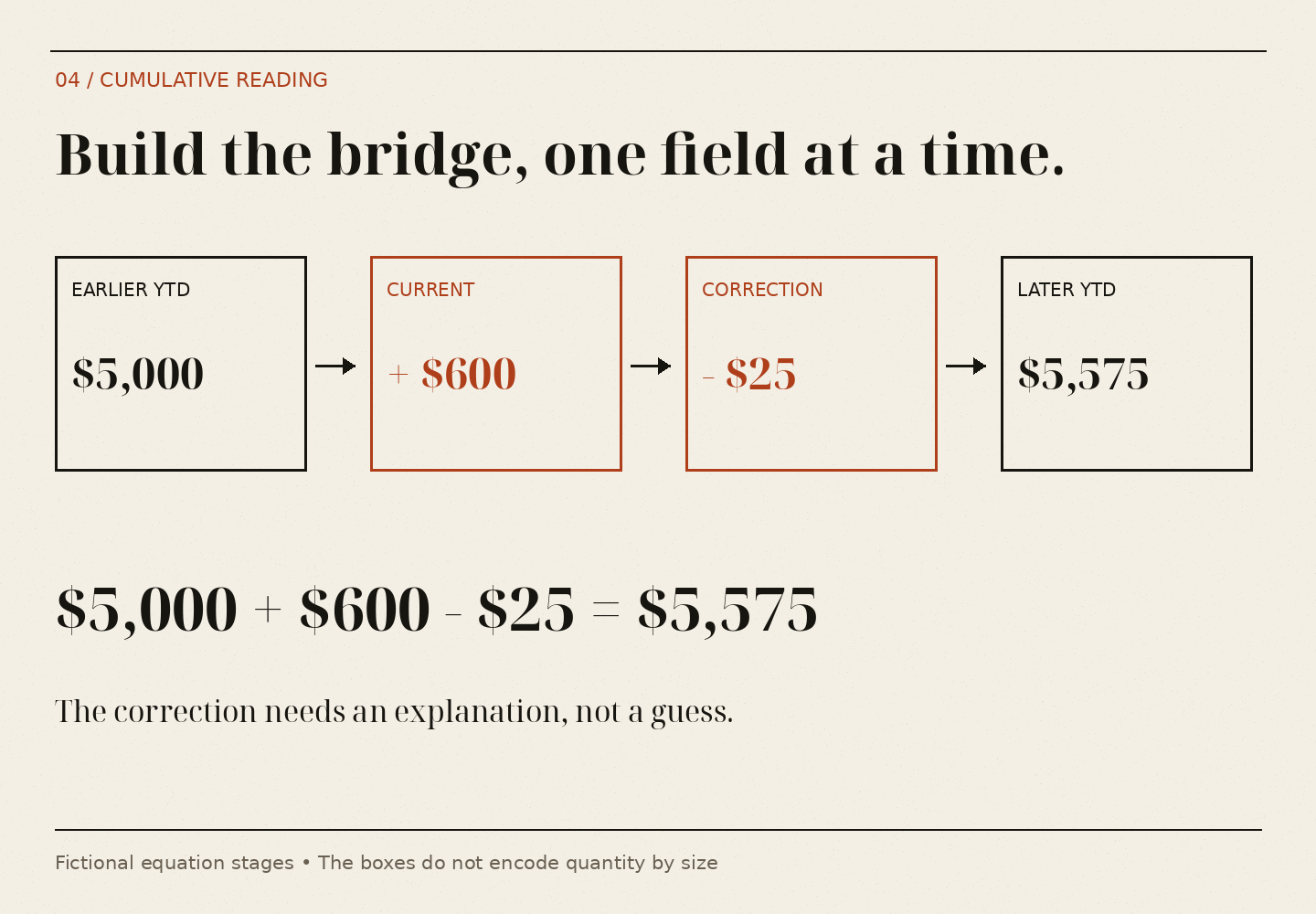
Consider an earlier YTD value of $5,000.00, a current amount of $600.00 and a later YTD value of $5,575.00. The simple difference is $575.00, which is $25.00 less than the current amount. A separately documented negative $25.00 correction would reconcile those fictional values: $5,000.00 plus $600.00 minus $25.00 equals $5,575.00.
Without documentation, however, the negative correction is only a hypothesis. The correct next question is which entries explain the $25.00 difference. Do not insert an adjustment into your own record as if payroll had confirmed it.
If a correction is supplied, ask whether it appears in the current column, only in cumulative history or on a replacement statement. Different positions require different comparisons. A current total that already includes the correction should not have the correction subtracted again.
Keep the year boundary explicit
The phrase year-to-date suggests a starting point, but a reader should still identify the year and the system's stated scope. Comparing the last cumulative amount of one year with the first of the next as though they were a continuous running total can create a false discrepancy.
Put the year beside the field name in your private note. “Regular earnings, 2026 YTD” is clearer than “earnings total.” If a report is reissued later, also preserve the version or issue date so you can distinguish a revised historical total from a current-year update.
Do not infer tax reporting treatment from the earnings-period label alone. A cross-year question may require the employer's payroll explanation or qualified tax guidance. This publication does not decide which year's tax form should contain a particular amount.
Use subtraction to expose, not erase, uncertainty
A comparison note can contain four columns: earlier cumulative value, later cumulative value, their difference, and current or intervening rows available to explain it. Add a final unresolved amount only after keeping those categories separate.
For example: earlier $2,300.00; later $2,975.00; change $675.00; available current row $650.00; unexplained difference $25.00. That final phrase means the supplied records do not yet explain the change. It does not mean an employer owes $25.00 or has taken $25.00 improperly.
Direction matters. Say whether the cumulative change is higher or lower than the available rows. Avoid an unsigned “difference 25” that forces the next reader to reconstruct your subtraction. A precise note makes the question easier to answer and makes a later explanation easier to verify.
Do not combine unrelated cumulative fields
A federal-income-tax wage field, a Social Security wage field, gross earnings and a deduction total can have different definitions. A reader should not expect all YTD columns to increase by the same amount. The IRS W-2 instructions provide context for distinct wage and withholding fields; they are not a legend for an employer's statement.
If a label is unclear, ask which included and excluded categories define it. The answer may explain why two totals differ without changing either total. Understanding the measure is more useful than forcing numbers into equality.
Once payroll provides the scope, save the definition with the comparison rather than relying on memory. A later statement can then be checked against the same definition, while remaining alert to a system or code change. The result is a small, durable explanation of one cumulative relationship, not a homemade substitute for the employer's payroll history.
Sources and scope
Official context checked October 14, 2026. The methods and worked figures are original educational examples. No individual legal or tax determination, deposit forecast or account service is provided.